Showing posts with label Microsoft. Show all posts

Monday, October 18, 2010

Will Apple Fall Again, Will History Repeat ?

Way back in 80’s when Xerox engineers came up with their ingenious Mouse and window based Operating System. The Xerox Boss laughed and said what do you think, we are going to sell mouse and put the project on scrap.

Young Engineers thronged to the Xerox center to study the Alto and Steve Jobs gave a commercial hit with the Mouse and GUI based or Window based Operating System to the world.

When all was going well ,Microsoft came in to the play , they developed (they indeed screwed Apple over icons and Dialog patent) a GUI operating system called Windows.

Stop Stop , this is a very old history, why we should talk about this now.

Because the war is out again, indeed in the same style. that time it was PC and this time it was Mobile platform

Then

Microsoft created Windows Operating System and distributed to multiple Hardware Vendors and that indeed cost very badly to Apple, Still now they are not out of it. The Status quo has changed from then.
appvswin

Now

Google has created a open source Operating System Android OS (decent copy cat of iOS) and doing the same, its distributing the Mobile Operating System to various hardware vendors . Apple is still going with its Hardware + Software Bounded Model, which has already cost them the huge PC market.

android_logo

Now to more foray Microsoft has launched its new Mobile Operating System, which means they also providing the software to multiple hardware.

windows-mobile-7-techcreeper

New Mobile OS are all set to come from Nokia + Intel called MeeGo, so the race is heating up.

Now if you take the stats , Once Apple iPhone has no competitor but now Google’s Android is capturing the smartphone market.

Now the Big Question is will Apple release iOS for other hardware ?

For me this is a simple question but for the company its a huge strategy shift, that will change the whole stuff.

But Apple has won our hearts with its cool creation iphone(same way they won with MAC long back). Will the History Repeats????…..

gallery01-20100607

Tuesday, March 2, 2010

Ding Ding Buumm – Touch Screen SkinPut

Remember Singaravelan Movie(Tamil) where Kamal hasan taps on Thai Amma’s Hand and says

“Ding Ding Ding Bummm” --- People have used this to found a new touch screen technology called Skinput ( I think People in Microsoft Research Lab has been inspired from this movie lolz (Tamil Lollu))

Technology

This future technology is developed in collaboration with Microsoft and Carnegie Mellon University. The system works with acoustic waves i.e. it has the ability to pick the Ultra low frequency sound also it can have a pico projector to display the User Interface on the Hand

500x_skinput (1) 

Working

When ever we tap on our Arms or Hand we get sound, people have captured that sound to recognize which part of the hand you have tapped based on the Bone density, Mass and size, distance between the joints and also filtering from soft tissues this makes each skin area sound as unique one or the system can easily identify the “Skin Button”

If you normally tap the hand we won’t feel any difference but when seen in a slow motion each tapping produce a transverse wave. This technology is actually harnessing those bio acoustic waves for processing.

The system beams a keyboard or menu onto the user's forearm and hand from a projector mounted in an armband. The acoustic detector which is also mounted in the armband will calculate which area the user has touched the skin.

The system could use wireless technology like Bluetooth to transmit commands to many types of device including phones, iPods and even PCs , TV etc

image

In Picture : Chris Harrison ( Researcher, Man behind the Technology)

Interface


Currently the research claims to have achieved a 95.5% accuracy in tapping, the pictures shows the different tapping areas of the hand

image

The Tap area gives us minimum 10 skin button which is enough to control any Phones or Personal Media player (PMP) like iPods, MP3 players,

image

The above picture shows the User can regular User interface with back button or like this they have developed scrolling option in hand, if you tap on top of the hand it will scroll up, if you tap near hand elbow joint it will scroll down. To go back to previous screen you need to pinch or touch your thumb finger with any other finger.

The Touch screen technology is surely different one.

Applications

So far this is a Research Project has some cool applications. The below picture shows user controlling Tetris game in the computer by tapping his finger

 image

This below picture is showing a tetris game projected on your hand using pico projector

image

Source : New scientist

Watch this video

so the Future is your hand saying is becoming true :)

Monday, February 15, 2010

Tech Tweets : Windows Mobile 7 Phone Series

So its the last throw of Dice for Microsoft in Mobile Phone OS arena, after its over taken by Iphone OS and Android. It Seems 7 is been lucky for Microsoft ,Lets see what this Windows Mobile 7 Phone OS offers

Core OS

Good News is Microsoft has developed this OS from the existing Zune OS leaving the Old Windows Mobile 6.5 in Scrap. But Bad News is for Windows Mobile App developers, no news as of now whether it support .Net Compact framework or backward compatibility with old Windows Mobile 6.5. Microsoft is yet to provide its new SDK for this version of OS.

User Interface

Gone are the days when we use Stylus in touch screen PDA and Smart phone (PALM, HP ipaq, Asus etc) when Iphone made everything work with your fingers

Windows Mobile 7 Phone has new concept call hub, it has 6 hubs organized as People, Pictures, Games, Music + Video, Marketplace, and Office. which is called as Live Titles, you can modify the home screen to some extend.

wm71

The interface is much like Zune HD with flipping, zooming all fancy stuff. if you Scroll down to find more big, live tiles: Calendar, Exchange, Windows Live, Me and Xbox Live. Scroll right to find the list of all apps on your phone.

Music

it uses the same Zune HD interface , just like we have ipod feature in iphone we have zune in Windows phone

zune music

Social Networking & Browsing

people it support Face book ( every one knows Microsoft invested heavily on FB) and windows Live so you can always be connected. it supports other Social networking also.

The new Web browser is based on Internet Explorer, and includes pinch-to-zoom and automatic column reformatting. Bad news is as of now it does not supports FLASH, it seems everyone is moving in Apple way.

Every phone will have Bing Search button :)

Pictures Gallery

This one is cool they have separate gallery view which is very much integrated with social networking you can directly sync with any cloud or social networking for real time update. off course you have all that multi touch zooming and scrolling option

pictures zune

Games

The whopping mobile gaming market which Iphone has created must have made Microsoft to include this feature, We have a cool new Xbox Live for mobile, its same as the Xbox Live which we have inXbox 360 connect to your gaming world via phone and enjoy the games.

xbox livre

Email & Office

This is one will take the blackberries off the shelves the best mobile email client ever the integration is so superb and it has office onenote to take down all the notes

wm office

Hardware partners

Microsoft told earlier that HTC touch flo will not be a feature of this phone, the phone is heavy in graphics and they are smooth, sleek too. They had made a strict minimum requirements for this software to run such as

  1. Capacitive multitouch screen with atleast 4 point touch
  2. 5 – Megapixel camera
  3. FM Radio
  4. etc

As of now Microsoft is working with Qualcomm, LG, Samsung, Garmin Asus, HTC, HP, Dell, Sony Ericsson, and Toshiba. AT&T's their "premiere partner" in the US.

Saturday, February 13, 2010

Unlock Hidden Themes in Windows 7

By Default Windows 7 Comes with cool themes but still windows 7 have cool country Specific Themes

Let’s see how to unlock the Feature

Go to Control Panel –> Appearance and Personalization –> Folder Option

Uncheck the Hide Protected Operating System Files (Recommended)

image

Click “Yes” button on the security warning and click Ok button.

Then go to the following path C:\Windows\Globalization\MCT there you can find themes country wise

image

Folder Names Countries
AU Australia
CA Canada
GB Great Britain
US United States
ZA South Africa


I really felt South African Wallpapers were cool

image

Open the MCT – AU or any Folder and open Themes folder and double click it to enjoy the cool themes

For More Windows 7 Themes Click Here

Monday, December 28, 2009

Cool New Calculator in Windows 7

We all knew windows always have calculator but windows 7 has bit more to offer. Lets see it

Basic Calculator

image

Scientific Calculator


image

Programmer Calculator


image

This one is cool, you can do your digital calculation Binary to Hex, Or, Xor Operation…

Statistics Calculator


image

Now we are done with 4 new types of calculator lets see what all new features it offers. They have made calculator to be useful in our day to day life

Unit Conversation

No More googling for these stuffs

image

Other Options

image

Date Calculation

We can find date difference, you age etc :)

image 

Add or subtract between dates :)

image

Worksheets

This is yet another cool tool to calculate

image 

Mortgage calculation


image

You can calculate monthly payment, Down payment, No of Years and Interest Rate

Vehicle Lease

image

Fuel Economy

image

You have this in both KM and Miles.

So looked at the new calculator in Window 7, they still have lot to offer, Go grab one soon

Wednesday, April 22, 2009

New Features in Visual Studio 2008

Visual Studio 2008 made its presence since Nov 2007 but it did not had a major impact, Now Visual Studio 2010 is going to come but I am just now going through the new features of visual studio 2008

I am going to List only Important features

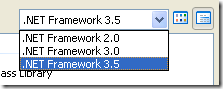
Multi .Net Frame Work Support

To be honest , I have been converting projects from Visual Studio 2002, 2003 to 2005, when I heard Visual Studio 2008 was came, my first thought was oh god i have to again convert my project and need to have 2 IDE in my machine (2005 & 2008) but VS 2008 has multi .Net Framework support

  • .Net 2.0
  • .Net 3.0
  • .Net 3.5

File –> New Project or New Website you can see this
image

The reason is all the version has same CLR 2.0 hence this feature has been given

JSCRIPT , JAVASCRIPT Debugging Support

I have been waiting for this feature for almost 3yrs when I started my career as web developer. This iscool feature previously, we debug JavaScript using alert box now those days are gone. we have JavaScript debug support

Javascript Intellisense Support

After the dawn of web 2.0 ASP.net has to move according. So they provided ASP.net AJAX which can be integrated with Visual Studio 2005 as Extension. Now Visual Studio 2008 has provided with JavaScript Intellisense support and making AJAX developer, JavaScript validation much easier.

Debugging .NET Framework Library Source Code

Recently some part of the .Net Framework has been made open source hence this feature is no surprise, but important we can now debug through .net functions for example Gridview .Databinding() we can go through the method via debug

 Design time Support for the Nested Master Page

When Master Page was introduced in .net 2.0 framework, this feature was not there in VS 2005 in design time. But this is cool and promised feature that VS 2008 has delivered. You can created nested Master page and then it can be seen in the IDE itself rather than in runtime

Multithreaded Debugging Features in VS 2008

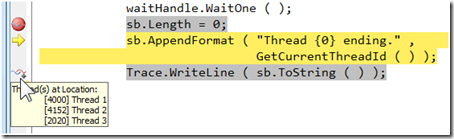
Sometimes the little features can make a world of difference. The VS 2008 debugger adds some help to those of us dealing with many threads running in our applications. The first is Show Threads in Source, which you can turn on either by selecting it from the context menu in the Threads window or the toggle button on the Debug toolbar (it's the one with the wavy lines and plus sign). Once Show Threads in Source, you'll see some new icons in the editor margin as shown below.
multhread

Intellisense Box display position

The Cool features in whole Visual Studio is IntelliSense when you type .  the intellisense drops down but it hides the code lines so to view those hidden codes press CTRL key it will automatically turn transparent and you can view the code and release the CTRL key you get back the IntelliSense box

Design View and CSS Design Tools

Visual Studio 2008 now has a rich CSS editing experience with several new tools to make working with cascading style sheets (CSS) easier than ever. Much of the work designing the layout and styling content can be done in Design view using the CSS Properties grid, the Apply Styles and Manage Styles panes, and the Direct Style Application tool. You can also change positioning, padding, and margins in Design view using WYSIWYG visual layout tools

Visual Studio 2008 Split View

spit_view

Imagine you could split the HTML Markup or XAML Markup and your C# code in two different monitor that cool rite no more going back to HTML Markup or XAML and coming back to C# code, In VS 2008 we can configure this split view feature to vertically, this allows developers to use maximum screen on laptops and wide-screen monitors

Expression Blend Support

By releasing Expression Studio Microsoft official entry to design mode, Expression Blend is an alternative for Adobe Flash but has cool feature it can be coded via C# or VB.net and then it can consume web service very easily. So you can design in XAML using Blend and you right click and create C# code in Visual Studio on the Fly

Other Features

  • LINQ
  • ASP.net AJAX integrated
  • IntelliSense Filtering Support
  • HTML JavaScript error as Warnings
  • LINQ Designer
  • Multilingual User Interface Architecture – MUI

Hope I have covered almost all the new features in Visual Studio 2008

Technorati Tags:
Share this post :

Sunday, April 12, 2009

How to Prevent Sending Mails without Subject in MS outlook 2003/07

It's quite often some time we send mail without mentioning subject line, that creates bad impression some times, to solve this problem I found this solution , thought of sharing with you guys

Steps :

  • Open MS Outlook 2003 /2007
  • Press Alt+F11, This will open the Macro Visual Basic Editor
  • On the Left Pane, you can see "Microsoft Outlook Objects" expand that
  • Look for the menu "ThisOutLookSession"
  • Click on the menu "ThisOutLookSession" and copy paste the below code
    Code :
Private Sub Application_ItemSend(ByVal Item As Object, Cancel As Boolean) 
Dim strSubject As String
strSubject = Item.Subject
If Len(strSubject) = 0 Then
Prompt$ = "Subject is Empty. Are you sure you want to send the Mail?"
If MsgBox(Prompt$, vbYesNo + vbQuestion + vbMsgBoxSetForeground, "No Subject Warning") = vbNo Then
Cancel = True
End If
End If
End Sub


  • Save the  and close Visual Basic Editor


  • Then in Outlook , click Tools > Macros > Security > In the Security Level Tab > Select the option MEDIUM > OK (in outllook 2003)


  • In outlook 2007 click Tools > Macros > Security > select warn for all marcros


  • Now Restart the Outlook, a dialog box pops up to Disable / Enable the macros; select as Enable Macros (this option will pops up when ever you restart outlook.)


So when ever you send a email without subject a Message Box will popout saying "Subject is Empty. Are you sure you want to send the Mail?" ,

if you want to proceed you can click Yes else No

Thus our problem is solved.

How to save in MS Word 97 – 2003 format by default in MS Word 2007

We send documents to our office counterpart or client who might or might not have MS word 2007, so we always have to remember to save it in MS word 97 – 2003. To Solve this we can have save to MS word 97 – 2003 as default save option.

Solution

  • Open MS Office Word 2007
  • Press ALT + F or click  on the office logo on the below screen   

WordRibbon

  • The following screen will appear

WordSave

  • click Word Option
  • Click the Save Tab on the following screen

WordOption2

  • Select the Word 97- 2003 Document option from the Save files in this format dropdownlist
  • Click Ok button

The Problem is solved.

Saturday, December 29, 2007

Parental Control Blocking Websites in Home

There are lots of software available in the market this will be easy and simple solution to block sites in the home . I am showing only in windows XP (SP2)

click Start -- > run then copy & paste this

notepad c:\WINDOWS\system32\drivers\etc\hosts

click ok or tap Enter button. This will automatically a notepad like the below screen

you can see a line containing the following text

127.0.0.1 localhost

for eg if you want to block orkut in home enter the new line

127.0.0.1 orkut.com

127.0.0.1 yahoo.com

remember all the sites you want to block should be given in seperate lines.

if you want to give access to the particular site you should remove that line and save the file, this will unblock the sites