Wednesday, April 22, 2009

New Features in Visual Studio 2008

Visual Studio 2008 made its presence since Nov 2007 but it did not had a major impact, Now Visual Studio 2010 is going to come but I am just now going through the new features of visual studio 2008

I am going to List only Important features

Multi .Net Frame Work Support

To be honest , I have been converting projects from Visual Studio 2002, 2003 to 2005, when I heard Visual Studio 2008 was came, my first thought was oh god i have to again convert my project and need to have 2 IDE in my machine (2005 & 2008) but VS 2008 has multi .Net Framework support

  • .Net 2.0
  • .Net 3.0
  • .Net 3.5

File –> New Project or New Website you can see this

image

The reason is all the version has same CLR 2.0 hence this feature has been given

JSCRIPT , JAVASCRIPT Debugging Support

I have been waiting for this feature for almost 3yrs when I started my career as web developer. This iscool feature previously, we debug JavaScript using alert box now those days are gone. we have JavaScript debug support

Javascript Intellisense Support

After the dawn of web 2.0 ASP.net has to move according. So they provided ASP.net AJAX which can be integrated with Visual Studio 2005 as Extension. Now Visual Studio 2008 has provided with JavaScript Intellisense support and making AJAX developer, JavaScript validation much easier.

Debugging .NET Framework Library Source Code

Recently some part of the .Net Framework has been made open source hence this feature is no surprise, but important we can now debug through .net functions for example Gridview .Databinding() we can go through the method via debug

 Design time Support for the Nested Master Page

When Master Page was introduced in .net 2.0 framework, this feature was not there in VS 2005 in design time. But this is cool and promised feature that VS 2008 has delivered. You can created nested Master page and then it can be seen in the IDE itself rather than in runtime

Multithreaded Debugging Features in VS 2008

Sometimes the little features can make a world of difference. The VS 2008 debugger adds some help to those of us dealing with many threads running in our applications. The first is Show Threads in Source, which you can turn on either by selecting it from the context menu in the Threads window or the toggle button on the Debug toolbar (it's the one with the wavy lines and plus sign). Once Show Threads in Source, you'll see some new icons in the editor margin as shown below.

multhread

Intellisense Box display position

The Cool features in whole Visual Studio is IntelliSense when you type .  the intellisense drops down but it hides the code lines so to view those hidden codes press CTRL key it will automatically turn transparent and you can view the code and release the CTRL key you get back the IntelliSense box

Design View and CSS Design Tools

Visual Studio 2008 now has a rich CSS editing experience with several new tools to make working with cascading style sheets (CSS) easier than ever. Much of the work designing the layout and styling content can be done in Design view using the CSS Properties grid, the Apply Styles and Manage Styles panes, and the Direct Style Application tool. You can also change positioning, padding, and margins in Design view using WYSIWYG visual layout tools

Visual Studio 2008 Split View

spit_view

Imagine you could split the HTML Markup or XAML Markup and your C# code in two different monitor that cool rite no more going back to HTML Markup or XAML and coming back to C# code, In VS 2008 we can configure this split view feature to vertically, this allows developers to use maximum screen on laptops and wide-screen monitors

Expression Blend Support

By releasing Expression Studio Microsoft official entry to design mode, Expression Blend is an alternative for Adobe Flash but has cool feature it can be coded via C# or VB.net and then it can consume web service very easily. So you can design in XAML using Blend and you right click and create C# code in Visual Studio on the Fly

Other Features

  • LINQ
  • ASP.net AJAX integrated
  • IntelliSense Filtering Support
  • HTML JavaScript error as Warnings
  • LINQ Designer
  • Multilingual User Interface Architecture – MUI

Hope I have covered almost all the new features in Visual Studio 2008

Technorati Tags:
Share this post :

Gadget Store – Convert Your Mobile Camera as Web Cam on the Go

Almost all the Cell Phones have camera now a days, We hardly use it for photographs and video recording, but it can be used for other functions also but with little bit of software help.

Imagine you are chatting with a friend and suddenly you realize you want to see your sweet dear ones but oops you don’t have a web cam, what will you do?

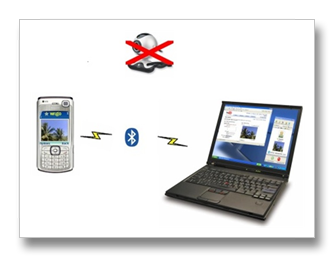
Relax guys you have a solution we have a software called “WWIGO”

WWIGO – Webcam Wherever I Go – cool rite ,

It’s a free software you can download from here and the best part , its developed by a INDIAN company Motvik and the worst part is it supports only NOKIA Symbian S60 v2.0 or v3.0 phones.

Working

The Software has two parts one installed in Cell Phones and other installed in your PC. It will work with your phone Bluetooth. So, it work wireless that's cool rite. With Modern and high end camera’s you will get better quality.

What you can do with WWIGO-

  • Use the camera phone as a wireless webcam.
  • Use it with Youtube to share videos and upload them.
  • Use with Skype, Yahoo! messenger etc. for live video chatting.

WWIGO is a free alternative to commercially available Mobiola Web Camera. I’ve not practically tried that because I have Sony Ericsson K750i unlucky for this :(

Hardware Specs

Specification Description
Mobile Phone Nokia Symbian S60 v2.0
Windows XP or Vista PC or Laptop
Bluetooth Both in Phone and PC

So with this software you can convert your mobile phone into web cam ;)

Share this post :

Tuesday, April 14, 2009

Gadget Store – See Your Cell Phone Video in Big Screen Using Mini Projector

Gadgets

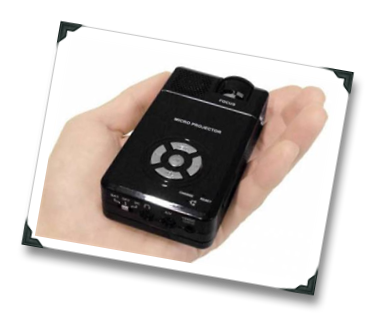
I have always wanted a pin hole projector in my cell phone so that i can view the video, images in a real big screen hmmm, It was once a dream, now people are working hard to bring that true, Imagine your cell phone having a projector in build, that too much rite, as of now we can attach a projector to your Cell Phone, Yes a mini and portable projector that can fit your pocket

The Gadget is named as AAXAP1 , its a product of AAXA's company,The device use LCOS chip, which enables the device to project a 60-inch image at 640 x 480 with 12 lumens brightness. The device weighs in at 168 grams and is no larger than most PDA and high end smart phone.

More over the Mini Projector supports multiple devices like IPOD, PSP, cell phones etc … The Projector has a in build 1GB storage  It costs 14, 070 ($289), included with the projector is a battery, composite input cable, and charger. A Tripod, microSD cards and mini-USB cable are available separately.

But its not available in INDIA yet as of April 2009….


Specification

Features Description
Resolution VGA - 640 x 480
Brightness 12 lumuns
Battery Life 45mins to 60mins
Projection area 60 – inch
Formats MP4, AVI, WMA, JPG, GIF, HTML, etc.
Output Mini USB
Weight 170 grams
Price $289
Availability Not in INDIA
Technorati Tags: ,

Sunday, April 12, 2009

How to Prevent Sending Mails without Subject in MS outlook 2003/07

It's quite often some time we send mail without mentioning subject line, that creates bad impression some times, to solve this problem I found this solution , thought of sharing with you guys

Steps :

  • Open MS Outlook 2003 /2007
  • Press Alt+F11, This will open the Macro Visual Basic Editor
  • On the Left Pane, you can see "Microsoft Outlook Objects" expand that
  • Look for the menu "ThisOutLookSession"
  • Click on the menu "ThisOutLookSession" and copy paste the below code
    Code :
Private Sub Application_ItemSend(ByVal Item As Object, Cancel As Boolean) 
Dim strSubject As String
strSubject = Item.Subject
If Len(strSubject) = 0 Then
Prompt$ = "Subject is Empty. Are you sure you want to send the Mail?"
If MsgBox(Prompt$, vbYesNo + vbQuestion + vbMsgBoxSetForeground, "No Subject Warning") = vbNo Then
Cancel = True
End If
End If
End Sub


  • Save the  and close Visual Basic Editor


  • Then in Outlook , click Tools > Macros > Security > In the Security Level Tab > Select the option MEDIUM > OK (in outllook 2003)


  • In outlook 2007 click Tools > Macros > Security > select warn for all marcros


  • Now Restart the Outlook, a dialog box pops up to Disable / Enable the macros; select as Enable Macros (this option will pops up when ever you restart outlook.)


So when ever you send a email without subject a Message Box will popout saying "Subject is Empty. Are you sure you want to send the Mail?" ,

if you want to proceed you can click Yes else No

Thus our problem is solved.

How to save in MS Word 97 – 2003 format by default in MS Word 2007

We send documents to our office counterpart or client who might or might not have MS word 2007, so we always have to remember to save it in MS word 97 – 2003. To Solve this we can have save to MS word 97 – 2003 as default save option.

Solution

  • Open MS Office Word 2007
  • Press ALT + F or click  on the office logo on the below screen   

WordRibbon

  • The following screen will appear

WordSave

  • click Word Option
  • Click the Save Tab on the following screen

WordOption2

  • Select the Word 97- 2003 Document option from the Save files in this format dropdownlist
  • Click Ok button

The Problem is solved.

Saturday, December 29, 2007

Parental Control Blocking Websites in Home

There are lots of software available in the market this will be easy and simple solution to block sites in the home . I am showing only in windows XP (SP2)

click Start -- > run then copy & paste this

notepad c:\WINDOWS\system32\drivers\etc\hosts

click ok or tap Enter button. This will automatically a notepad like the below screen

you can see a line containing the following text

127.0.0.1 localhost

for eg if you want to block orkut in home enter the new line

127.0.0.1 orkut.com

127.0.0.1 yahoo.com

remember all the sites you want to block should be given in seperate lines.

if you want to give access to the particular site you should remove that line and save the file, this will unblock the sites

Tuesday, December 18, 2007

Read PDF in Mobile Phone or IPOD or MP3 Player

Hi want to read PDF books on the go u can do it with the new software ebook to Images

what the tool does was it will convert the pdf files to images that fit to ur phone or ipod screen so that u can read on the go one pain point is it creates lots of images and takes more memory than the ebook but its a cool feature and a long waited option to read pdf files in java phones like k750i etc.

just download the software from this site

“eBook to Images” at
merlinsoftware.com

DOwnload and install it in the pc and convert the PDF file to Images and load it in ur Phone or IPOD or MP3 Player and enjoy