Wednesday, May 6, 2009

Gadget Store : Hand Fitness Trainer for Your Wrists

we all spent more time with your Keyboard, Mouse, Cell Phones , Joy pads(videogames), lot of work for our Fingers, wrist and no time for us to give proper attention to those until we get some pain or Repetitive Strain Syndrome(RSI).

Here is a cool gadget to keep our hands fit, remember guys without these hands and finger we have no job :) lolz, so take care of those

hft This is looks like a cyborg rite but it works like this

A recipient of the prestigious Medical Design Excellence Award, this is the hand fitness trainer that can slow the progression of osteoarthritis and mitigate the effects of repetitive-motion injuries in the hands. The device slips on like a glove and has elastic bands that strap to each fingertip, providing resistance as you open your hand. By flexing your hand in the opposite direction of its typical motion, the trainer strengthens the extensor muscles in your hands, wrists, and elbows, helping to reduce the painful symptoms of carpal tunnel syndrome, tennis elbow, and tendonitis.

handfitnesstrainer2-small

The cost of this glove is $39, you can buy from this site or ask some friends US to bring this for you, Remember Health is Wealth

Share this post :

Sunday, May 3, 2009

Gadget Store – Cool Computer Chairs to Work On

Enjoy computing with Luxury and Good Health


DayBed

1CANB5ERN

daybed2 

Zero-Gee ergonomic Computer / Gaming Chair

gaming chair

gamechair2

Gamers Cockpit GT3 race simulator

gamerchair

The Corner V1 computer desk

pcchair

Share this post :

Thursday, April 30, 2009

Gadget Store – Beat the Summer with Cool Sunglasses MP3 Player

Oakley Split THUMP Sunglass with MP3 Player


Oakley is a LifeStyle product company which has come up with a unique Sun Glassess which acutally play music.

The Sunglasses come with 1Gb an 2 Gb version, has a pair of detachable ear pieces, so it can be acted as normal sunglasses when you are not hearing the music. It will be a ideal gadget for this summer

The Sunglass has cool controls volume on the Right Stem has Play/pause/skip controls and the left with the

3

  • Volume controls. The Sunglasses has a USB interface so that you can just connect to the PC and download your favorite song The sunglasses are cool grab and go MP3 Players, no more messy wires and no more tangle, just grab and go.

    Features

    • Removable speakers plus hidden controls that seamlessly blend into the icons, allowing Split THUMP to look like normal sunglasses.
    • HIGH DEFINITION OPTICS®(HDO®) for clarity and precision that exceeds all ANSI Z87.1 standards of optical performance.
    • Sweat-resistant design to withstand your toughest workouts.
    • Incredible sound quality that has to be experienced to be believed.
    • Ability to store up to 500 songs on the 2 GB version, 250 songs on the 1 GB version, or 125 songs on the 512 MB version.
    • Up to 7 hours of playback time on a single charge, enough to last through even a marathon session.
    • Easy-to-use interface that gives you full, instant control of your music without having to fumble through your pockets, bag or backpack.
    • Compatibility with the iTunes® Plus Music Store*, Windows® Media Player®, WinAMP® and other popular music jukebox programs that use AAC, MP3, WMA and Audible® file formats.
    • Included Hi-Speed USB 2.0 cable for transferring song files easily from Mac® or Windows® PC.
    • Available in Black and White colors

    Read More :

    This is available in INDIA for a price tag of Rs. 16k

  • Wednesday, April 22, 2009

    New Features in Visual Studio 2008

    Visual Studio 2008 made its presence since Nov 2007 but it did not had a major impact, Now Visual Studio 2010 is going to come but I am just now going through the new features of visual studio 2008

    I am going to List only Important features

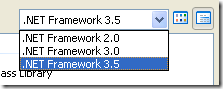
    Multi .Net Frame Work Support

    To be honest , I have been converting projects from Visual Studio 2002, 2003 to 2005, when I heard Visual Studio 2008 was came, my first thought was oh god i have to again convert my project and need to have 2 IDE in my machine (2005 & 2008) but VS 2008 has multi .Net Framework support

    • .Net 2.0
    • .Net 3.0
    • .Net 3.5

    File –> New Project or New Website you can see this
    image

    The reason is all the version has same CLR 2.0 hence this feature has been given

    JSCRIPT , JAVASCRIPT Debugging Support

    I have been waiting for this feature for almost 3yrs when I started my career as web developer. This iscool feature previously, we debug JavaScript using alert box now those days are gone. we have JavaScript debug support

    Javascript Intellisense Support

    After the dawn of web 2.0 ASP.net has to move according. So they provided ASP.net AJAX which can be integrated with Visual Studio 2005 as Extension. Now Visual Studio 2008 has provided with JavaScript Intellisense support and making AJAX developer, JavaScript validation much easier.

    Debugging .NET Framework Library Source Code

    Recently some part of the .Net Framework has been made open source hence this feature is no surprise, but important we can now debug through .net functions for example Gridview .Databinding() we can go through the method via debug

     Design time Support for the Nested Master Page

    When Master Page was introduced in .net 2.0 framework, this feature was not there in VS 2005 in design time. But this is cool and promised feature that VS 2008 has delivered. You can created nested Master page and then it can be seen in the IDE itself rather than in runtime

    Multithreaded Debugging Features in VS 2008

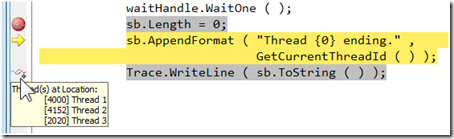
    Sometimes the little features can make a world of difference. The VS 2008 debugger adds some help to those of us dealing with many threads running in our applications. The first is Show Threads in Source, which you can turn on either by selecting it from the context menu in the Threads window or the toggle button on the Debug toolbar (it's the one with the wavy lines and plus sign). Once Show Threads in Source, you'll see some new icons in the editor margin as shown below.
    multhread

    Intellisense Box display position

    The Cool features in whole Visual Studio is IntelliSense when you type .  the intellisense drops down but it hides the code lines so to view those hidden codes press CTRL key it will automatically turn transparent and you can view the code and release the CTRL key you get back the IntelliSense box

    Design View and CSS Design Tools

    Visual Studio 2008 now has a rich CSS editing experience with several new tools to make working with cascading style sheets (CSS) easier than ever. Much of the work designing the layout and styling content can be done in Design view using the CSS Properties grid, the Apply Styles and Manage Styles panes, and the Direct Style Application tool. You can also change positioning, padding, and margins in Design view using WYSIWYG visual layout tools

    Visual Studio 2008 Split View

    spit_view

    Imagine you could split the HTML Markup or XAML Markup and your C# code in two different monitor that cool rite no more going back to HTML Markup or XAML and coming back to C# code, In VS 2008 we can configure this split view feature to vertically, this allows developers to use maximum screen on laptops and wide-screen monitors

    Expression Blend Support

    By releasing Expression Studio Microsoft official entry to design mode, Expression Blend is an alternative for Adobe Flash but has cool feature it can be coded via C# or VB.net and then it can consume web service very easily. So you can design in XAML using Blend and you right click and create C# code in Visual Studio on the Fly

    Other Features

    • LINQ
    • ASP.net AJAX integrated
    • IntelliSense Filtering Support
    • HTML JavaScript error as Warnings
    • LINQ Designer
    • Multilingual User Interface Architecture – MUI

    Hope I have covered almost all the new features in Visual Studio 2008

    Technorati Tags:
    Share this post :

    Gadget Store – Convert Your Mobile Camera as Web Cam on the Go

    Almost all the Cell Phones have camera now a days, We hardly use it for photographs and video recording, but it can be used for other functions also but with little bit of software help.

    Imagine you are chatting with a friend and suddenly you realize you want to see your sweet dear ones but oops you don’t have a web cam, what will you do?

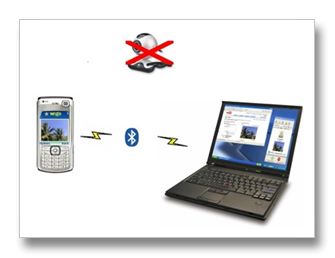
    Relax guys you have a solution we have a software called “WWIGO”

    WWIGO – Webcam Wherever I Go – cool rite ,

    It’s a free software you can download from here and the best part , its developed by a INDIAN company Motvik and the worst part is it supports only NOKIA Symbian S60 v2.0 or v3.0 phones.

    Working

    The Software has two parts one installed in Cell Phones and other installed in your PC. It will work with your phone Bluetooth. So, it work wireless that's cool rite. With Modern and high end camera’s you will get better quality.

    What you can do with WWIGO-

    • Use the camera phone as a wireless webcam.
    • Use it with Youtube to share videos and upload them.
    • Use with Skype, Yahoo! messenger etc. for live video chatting.

    WWIGO is a free alternative to commercially available Mobiola Web Camera. I’ve not practically tried that because I have Sony Ericsson K750i unlucky for this :(

    Hardware Specs

    Specification Description
    Mobile Phone Nokia Symbian S60 v2.0
    Windows XP or Vista PC or Laptop
    Bluetooth Both in Phone and PC

    So with this software you can convert your mobile phone into web cam ;)

    Share this post :